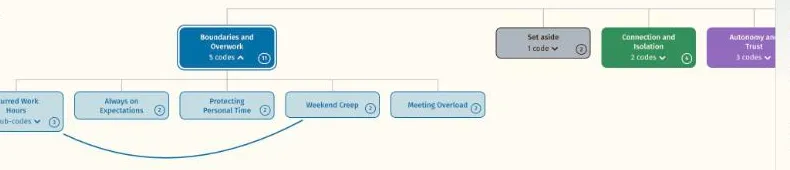
 Journal articleOpen →Boundaries and Overwork, level by levelReflexive thematic analysis · Hierarchy, one themeFigure 2, single column width · Working Well sample dataset
See your coding as a hierarchy
Your project, themes, codes and sub-codes laid out top to bottom, the shape a written findings chapter usually follows.
Used in phases 4, 5 and 6, reviewing themes and defining themes and writing up
Reorder it
Move themes and codes into the order you will write about them.
Sub-codes
A sub-code sits beneath its code in a lighter fill of the theme's colour.
The structure of your analysis, level by level
The hierarchy shows the same coding as the node network, arranged as a tree. Your project sits at the top, the themes sit beneath it in their colours, and each theme's codes and sub-codes branch below. Where the network shows how things cluster, the hierarchy shows how they nest.
It is the view most like the structure of a findings chapter, with a heading for each theme and a subheading for each code, which makes it a useful check before you start writing and a clear figure for a thesis.
Working with the hierarchy
Use it to check the shape of the analysis before you write.
Levels
The hierarchy shows themes, codes, sub-codes and a further sub-code level beneath those, each in a lighter fill of the theme's colour.
Theme order
The order column in the Framework tab sets the order themes appear in. Reordering in the viewer changes it for the display and is saved in the layout file.
For a report
Because it reads top to bottom, the hierarchy is often the clearest figure for a written chapter, where the node network suits a slide or a poster.
Related features
The features you will use alongside hierarchy, closest first.
See your own themes come to life
Try the live demo or start a 7 day free trial. Your data is read in your browser and never leaves your computer.