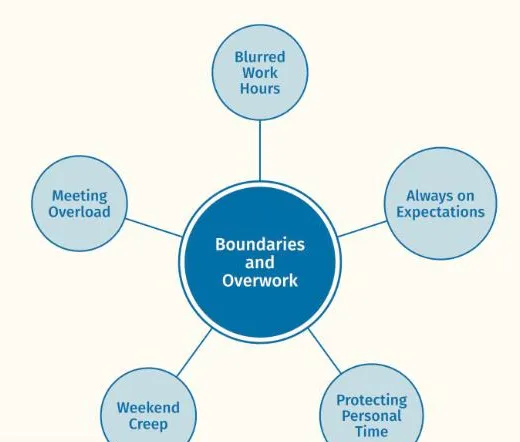
 ThesisOpen →Boundaries and OverworkReflexive thematic analysis · Node network, one themeA findings chapter, full text width · Working Well sample dataset
See your themes come to life
Thematic analysis software that turns your coded spreadsheet into an interactive map of themes, codes and quotes. Read in your browser, never sent anywhere.
Where Themescape fits in thematic analysis
Themescape displays and refines the coding you have already done. It does not create codes, analyse data or use AI. Researchers move back and forth between these phases rather than in strict order.
- 01
Familiarising yourself with the dataset
- 02
Coding
- 03
Generating initial themes
Group related codes into candidate themes. In Themescape, drag related codes together on the map and watch the groupings take shape.
- 04
Developing and reviewing themes
Check each theme against the coded data and the whole set. Move, merge and rename themes on the map and read the quotes behind each one until it holds.
- 05
Refining, defining and naming themes
Write a clear definition and choose the quotes that show each theme best. In Themescape, open each theme to write its working definition and mark its strongest quotes.
- 06
Writing up
Present the map and its quotes in your thesis, paper or slides. Switch to Present mode and export the map as a figure.
Three steps from spreadsheet to map
Code in the template, open it in the viewer and explore. Your data stays on your computer throughout.
Your data stays on your computer
Themescape reads your data in the browser. The host never receives it.
Read locally
Transcripts and quotes are read locally and never leave the machine.
Nothing to submit
No file submission or permanent storage is required.
Quotes untouched
Verbatim quotes are never altered, with a separate refined column for presentation wording.
Sheets is opt in
The Google Sheets mode is opt in, for non-sensitive data only.
Built for the work of thematic analysis
Everything you need to review, refine and present your themes, in one browser tab. Each feature has its own page with the detail.
Three views of the same data
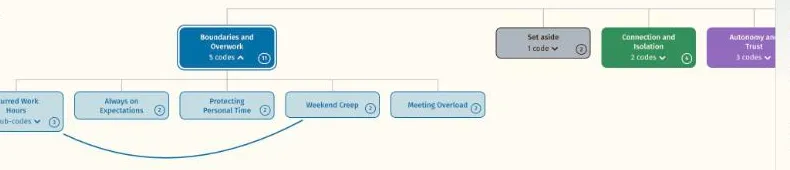
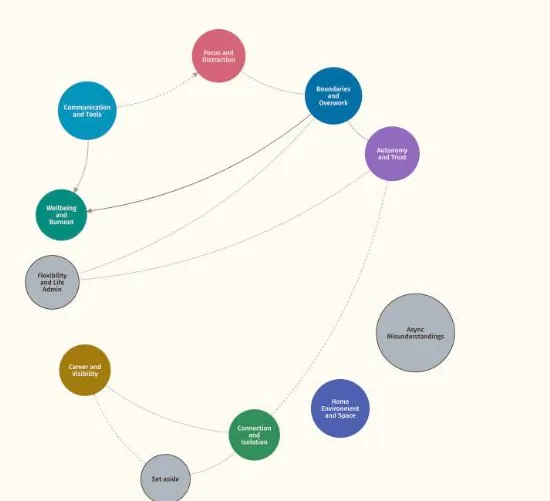
Read one analysis as a node network, a hierarchy or a file tree, and switch between them as the question changes.
Definitions and quotes on selection
Select a theme or code to see its working definition, the participants behind it and its quotes.
Search across everything
Find codes, themes and quote text in one search.
Export back to the spreadsheet
Take your refined themes, definitions and chosen quotes back to your spreadsheet.
Work mode and Present mode
Refine definitions and quotes in Work mode, then hide the tools to present to a supervisor, a panel or a conference.


Works beside your coding software
Keep coding in NVivo, ATLAS.ti, MAXQDA or a spreadsheet. Themescape sits beside them as the visualisation layer and replaces none of them. Your coding comes across through the spreadsheet template, a CSV export or a project file from NVivo, MAXQDA or ATLAS.ti.
For individuals, teams and organisations
One researcher, a supervisor with students, or a whole faculty. Each page covers the plan, the workflow and the figures that fit.
IndividualsMasters and doctoral students, academics and independent researchers. Start with a 7 day free trial.For individualsTeamsA supervisor and their students, or a research group, sharing one plan with named seats.For teamsOrganisationsA school, faculty or university, with a quote, a purchase order and an invoice.For organisations
Resources for your analysis
Guides, templates and answers, written for researchers using reflexive thematic analysis.
BlogArticles on thematic analysis, figures and writing up.Open →TutorialsShort guides to each part of the viewer.Open →FAQAnswers on data, pricing and the spreadsheet.Open →Spreadsheet templateThe template the viewer reads, with an example.Open →Form templatesWording for ethics applications, information sheets and consent forms.Open →GlossaryTerms used in thematic analysis and in Themescape.Open →Figure galleryExample figures for theses, articles and slides.Open →Privacy and dataWhat to tell an ethics committee or an IT reviewer.Open →
Common questions
Short answers to what researchers ask most. The FAQ page has the rest.
Does Themescape use AI?
No. Themescape displays and refines the coding you have already done. It does not create codes, suggest themes or connections, analyse your data or use AI. Every theme, code, definition and link on the map is yours.
Does my data leave my computer?
No. When you load CSV files or import a project from your coding software, your browser reads them on your own computer and nothing is sent to Themescape. Transcripts and quotes are read locally and never leave the machine. No file submission or permanent storage is required. The one exception is a choice you make yourself, connecting a Google Sheet: The Google Sheets mode is opt in, for non-sensitive data only.
Do I need to install anything?
No. Themescape runs in your web browser, so there is nothing to install. Open it, load your files and the map appears. Your files are read in the browser on your own computer.
Do I still need my coding software?
Yes, if you use one. Themescape works alongside coding software such as NVivo, MAXQDA and ATLAS.ti and replaces none of it. Keep coding where you code, then bring the result in through the spreadsheet template or Import from your coding software, which changes nothing in your project.
Is there a free trial?
Yes. The Student and Researcher plans start with a 7 day free trial, and you pay by card after it. Team and organisation plans are bought by the semester or the year.
See your own themes come to life
Try the live demo or start a 7 day free trial. Your data is read in your browser and never leaves your computer.