
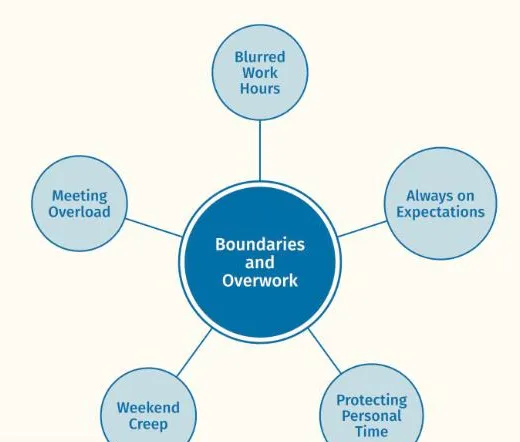
 ThesisOpen →Boundaries and OverworkReflexive thematic analysis · Node network, one themeA findings chapter, full text width · Working Well sample dataset
Resources for your analysis
Written for researchers using reflexive thematic analysis: the template, step by step tutorials, forms for ethics applications, a glossary and examples of finished figures.
Everything in one place
Pick the resource you need, or scroll for the newest of each.
BlogArticles on thematic analysis, figures and writing up.Open →TutorialsShort guides to each part of the viewer.Open →FAQAnswers on data, pricing and the spreadsheet.Open →Spreadsheet templateThe template the viewer reads, with an example.Open →Form templatesWording for ethics applications, information sheets and consent forms.Open →GlossaryTerms used in thematic analysis and in Themescape.Open →Figure galleryExample figures for theses, articles and slides.Open →Privacy and dataWhat to tell an ethics committee or an IT reviewer.Open →Themescape and NVivoWhat each does, side by side, and how they work together.Open →
Start here
The getting started tutorial, start to finish: open the template, code into it, load the file and see your first map. Then follow the written steps at your own pace.
From the blog
The three newest articles on thematic analysis, presenting findings and news from Themescape.
 Choosing and refining illustrative quotesHow to choose quotes that show what a theme means, tidy them for presentation, and keep the verbatim as the record.Read the article
 Moving a coded project from NVivo into the templateKeep coding in NVivo and bring the result into Themescape to see, refine and present it. What to do before you export, what comes across and what to tidy afterwards.Read the article
 Presenting your themes to a supervisorDescribing an analysis in words can take the whole meeting. How to prepare, what to show and what to ask, so supervision is spent on the thinking.Read the article
Tutorials
Step by step guides to using Themescape, in order from loading your first file to presenting your final themes.
Load your first fileMake a copy of the template, code a few rows, and open them in the viewer to see your first map.Getting startedOpen the tutorialSave your progress and carry on laterThemescape keeps no copy of your project. Save your work as files on your computer and load them next time.Getting startedOpen the tutorialImport a project from NVivo, MAXQDA or ATLAS.tiExport your NVivo, MAXQDA or ATLAS.ti project in the REFI-QDA format and import it, so your coding opens as a map without retyping.Getting startedOpen the tutorialMove between the three viewsThe node network, the hierarchy and the file tree show the same coding. Learn what each one shows and when to reach for it.ExploringOpen the tutorial
The spreadsheet template
This workbook is the data source for the Themescape viewer. It has seven tabs: Instructions is for reading, Data is where the coding happens and is the only tab the viewer needs, Framework, Connections and Settings are optional, and Model elements and Model relationships are for Model mode only. Download each tab you use as a CSV file; the viewer matches each file to its slot by its file name.
Template version 2.6.
| code | participant | quote | refined_quote |
|---|---|---|---|
| Daily company | Bella | Um, so, like, I get home and I just, you know, put it on straight away? Before I've even, like, taken my coat off. It's like, oh good, they're here. | I get home and put it on before I've even taken my coat off. It's like, good, they're here. |
| Knowing them well | Imogen | I know Teo always touches his collar before he lies. I'd spot it anywhere. | · |
| Shared struggles | Freya | Watching her panic in the lift was the first time I'd seen my anxiety on screen. I cried. | · |
| Rewatching | Mia | On a bad day I don't want anything new. I want the episode I've seen twenty times. | · |
| name | definition | order |
|---|---|---|
| A friend on the sofa | Viewers describe characters as familiar, warm presences in their daily lives, close to friends, though they know the warmth runs one way. | 1 |
| from | to | note |
|---|---|---|
| Who I wish I was | Borrowed courage | Admiring a braver character turns into courage used in real life. |
| project | researcher | subtitle |
|---|---|---|
| The Friends We Stream | Demo researcher | Bonds with characters from the series we watch |
| element_id | name | parent |
|---|---|---|
| JD | · | · |
| relationship_id | from | to |
|---|---|---|
| · | · | · |
Form templates
Wording for ethics applications, participant information sheets and consent forms, written around how Themescape handles data.
Consent form clauseConsent form
Consent statements covering analysis in the browser, quotes under a pseudonym and withdrawal.
Ethics application wordingEthics application
Paragraphs for the data management section of an ethics application, describing how Themescape reads data in the browser.
Grant application wordingGrant application
Paragraphs for the methods, data security and budget sections of a grant application.
View detailsComing soonParticipant information sheet wordingParticipant information
Plain language paragraphs for a participant information sheet, covering analysis in the browser and how quotes are used.
Glossary
The words of thematic analysis and of Themescape, each explained in a sentence or two. Useful when a supervisor, a reviewer or the software uses a term you have not met before.
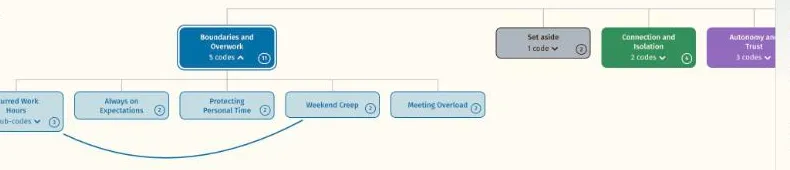
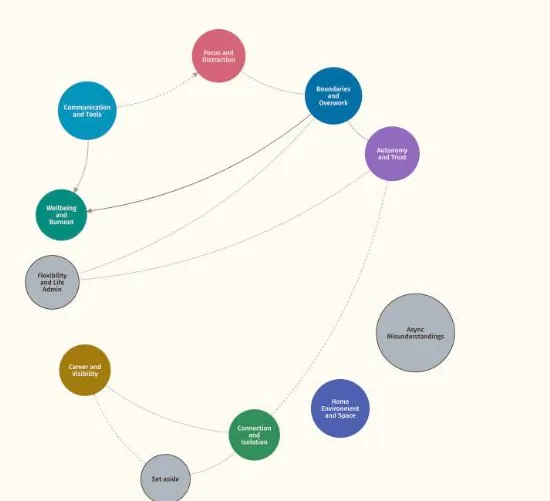
Thematic analysisCodeA short label the researcher gives to a segment of data to capture something meaningful about it. Codes are the building blocks themes are developed from.Read the entryThemescapeNode network viewThemes, codes and quotes drawn as connected circles, so the shape of an analysis can be seen at once.Read the entryThematic analysisThemeA pattern of shared meaning across a dataset, organised around a central idea, which the researcher develops from their codes and gives a name and a working definition.Read the entryThematic analysisWorking definitionA sentence or two saying what a theme or code means and what it holds, written early and revised as the analysis develops.Read the entry
Common questions
Short answers to what researchers ask most. The FAQ page has the rest.
What file types can I load?
CSV files saved from the spreadsheet template, one for each tab you have used, and the layout file Themescape saves when you arrange or build anything. A project exported in the REFI-QDA format from NVivo, MAXQDA or ATLAS.ti comes in through Import from your coding software. A Google Sheet can also be opened from its link: The Google Sheets mode is opt in, for non-sensitive data only.
What is in the spreadsheet template?
Seven tabs. Instructions explains the workbook, and Data holds one row per coded quote and is the only tab the viewer needs. Framework holds working definitions, theme order and colours, Connections records links between themes, codes, sub-codes and strands, and Settings holds your project title, name, subtitle and version. Model elements and Model relationships describe a published model, for Model mode only.
What do I tell my ethics committee?
That Themescape reads your files in your browser on your own computer and Themescape never receives them. The data handling statement on the Privacy and data page is written to attach to an application, and the form templates give wording for the application, the participant information sheet and the consent form. If you plan to connect a Google Sheet, say so, since the sheet is shared by link while you connect; if your approval covers only local storage, use CSV files.
Can I make a figure for my thesis or a paper?
Yes. Choose Export, then Figure for publication, or Export figure in Build mode's tools. Pick what to show, a referencing style (APA 7th, MLA 9th or Chicago 18th), a width and a file type: PNG or JPG at 300 or 600 dpi, or a vector PDF that stays sharp at any size. Quotes are never included in figures, and a figure should carry no names that could identify a participant.
Is there a free trial?
Yes. The Student and Researcher plans start with a 7 day free trial, and you pay by card after it. Team and organisation plans are bought by the semester or the year.
See your own themes come to life
Try the live demo or start a 7 day free trial. Your data is read in your browser and never leaves your computer.